It already knows what you are building on.
The AI inside Vibe Studio. It understands AppEngine — your collections, your identity model, your integrations — so it builds the interface straight onto a backend that already exists. Multi-tenant from the first line: which organisation it is working for is a fixed value it is handed, not something it decides. When it is done, it ships to hosting itself, or you take the source and go.
- Web app
- iPhone
- Android
- Desktop
- Whatever the project needs
One backend underneath all of them — the same collections, the same sign-in, the same integrations. Powered by Claude.
It asks the question a stranger could not.
A general coding assistant would have written a login form and guessed at an endpoint. This one asks the live platform first, finds three separate identities in play, and asks which you meant — because getting that wrong hands a customer a staff token.
- It looked, it did not guess. AppEngine publishes its own docs and OpenAPI live, so the agent reads the current platform rather than a cheat sheet somebody has to keep updating.
- The tenant is not a variable it invents. Your organisation id is a fixed machine value carried into every turn — never derived from a brand name, a hostname or the copy on the page.
- No wiring step. The route exists, the header is filled in, and it runs against your data the moment it is saved.
- You
Add sign-in to the client dashboard.
GET /discover/01-auth · reading the live auth docs- Agent
Who signs in here? There are three identities in play and they are not interchangeable — you, the builder; your customers, who see their own work; and staff, who run the business. Each has its own endpoint.
- You
Customers.
orgid ← .vibe/project.json · a machine id, never guessed- signin.js
const res = await fetch(`${BASE}/profile/customer/signin`, {
  method: "POST",
  headers: { orgid: ORG_ID, "Content-Type": "application/json" },
  body: JSON.stringify({ email, password }),
});
Ship it from here, or walk away with it.
Most builders make this the moment you discover what you actually bought. There are two ends to the work here and both of them are yours.
Deploy it
Straight onto the project it was built in.
- 01The workspace is packaged and handed to SpinForge directly
- 02DNS and TLS configured for you — there is no host to go and buy
- 03Live on your own domain, or on the project address it is given
- 04Every step reported as it happens, failures included
Or take it
The files are yours, in formats nobody has to decode.
- 01Ordinary source on disk, in the framework you chose
- 02No proprietary bundle and no export step to discover later
- 03Host it wherever you like — it still calls the same platform
- 04The backend does not move, so nothing has to be rebuilt
Not a chat window bolted to an editor.
Vibe Agent is one panel of Vibe Studio, alongside the files, the terminal and the preview. It is looking at the same project you are, in an environment that already has your platform in it.
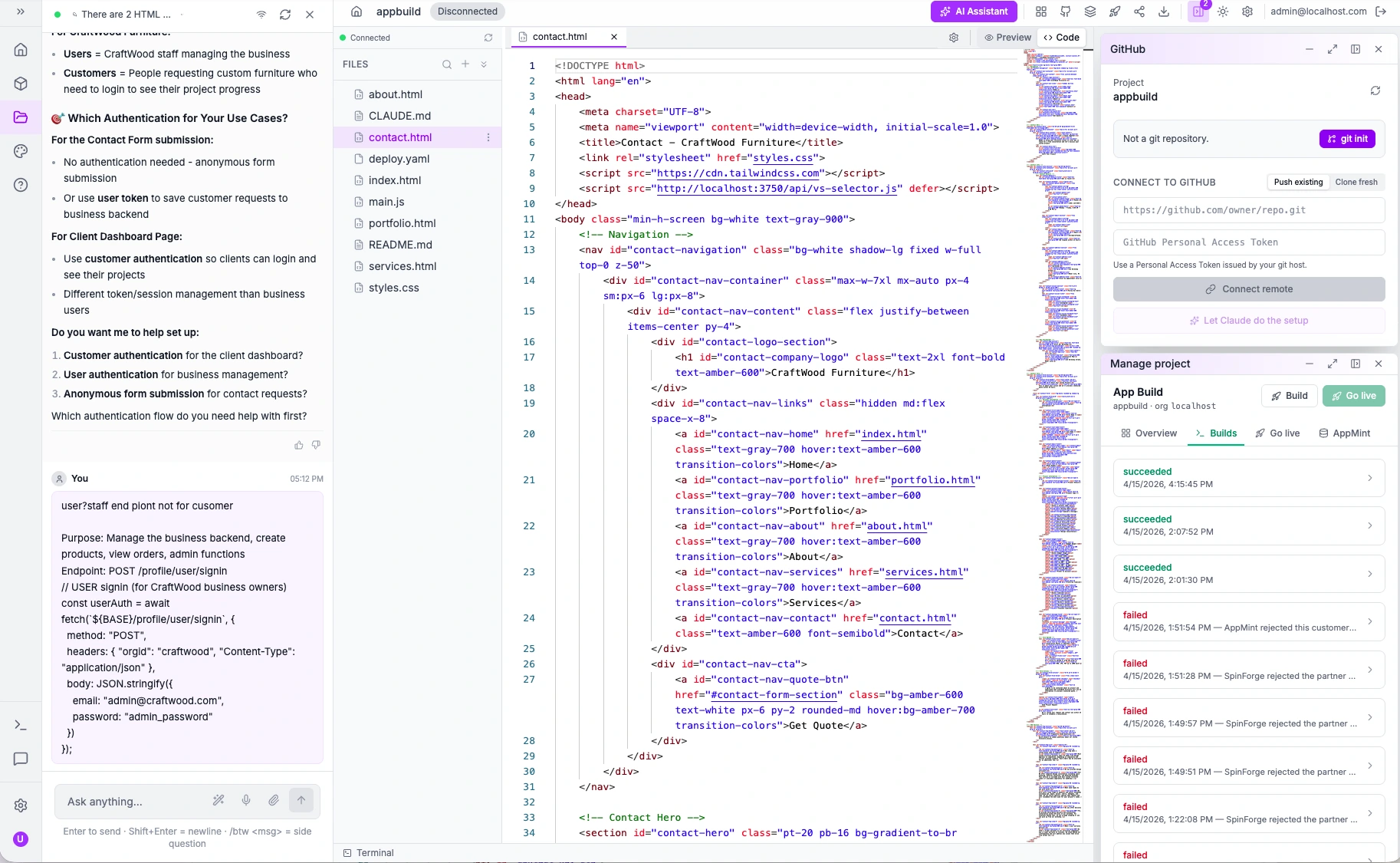
- 01It sees the project
Not a pasted snippet. The files on disk, the routes they call, and the collections behind them.
- 02You keep the code
Ordinary HTML, CSS, JS and a deploy manifest. Nothing proprietary to export from later.
- 03Same environment
Auth, integrations and agents are already running around it, so what it writes has something to call.
Not tied to one model vendor.
Which provider serves a request is configuration, not a rewrite — so you can pick what suits the task, survive a vendor's outage, and move as the field changes underneath you.
Providers
- Providers
- More than one, always
- Which you get
- Follows your plan, not a separate purchase
- Switching provider
- Configuration — your project does not change
- Vendor outage
- Move to another provider, keep working
- Bring your own client
- Point it at the same endpoint
- Lock-in
- Nothing is written against one vendor’s API
How it behaves
- Streaming
- Reasoning
- Returned alongside the answer, where your plan allows
- Vision
- Images alongside text
- Caching
- Spend ceiling
- Set per organisation, enforced on the server
- Concurrency
- Capped by plan, with per-org overrides
What it reaches
- Your collections
- Read and write, live
- Generated pages
- Bound to real records, not fixtures
- Wiring step
- None — already connected
- Org context
- Injected by the platform, never supplied by the model
- Permissions
- The same ones a person signs in under
- Metering
- Per call, per token, against your credit
The questions people actually ask.
Yours reads files. This one also reads the platform those files run on — the collections you defined, the identity types in your organisation, the routes that already exist. That is why it can ask whether you meant staff or customers instead of inventing an endpoint and leaving you to discover it does not exist.