Give it a goal. It drives the browser.
“Find 20 dental clinics in Dallas without a website and save them as leads.” LeadSearch searches, filters and captures on its own — or captures what you are looking at, one page at a time. Either way it lands as a real, deduplicated record in the CRM that already runs your business. Not exported. Not imported. Written.
Every other lead tool ends in a spreadsheet.
The usual shape is a scraper, then a file, then a mapping screen, then an import, then a week of untangling duplicates. Five steps between finding a lead and being able to work it — and every one of them a place where the data goes stale, gets mangled or quietly disappears.
- 01ScrapeA tool grabs what it can off the page
- 02Export CSVStraight into a file nobody owns
- 03Map the fieldsGuess which column is which
- 04ImportA wizard, a staging table, some errors
- 05DeduplicateFind out you already had half of them
- 06AssignRoute it to a rep, by hand
LeadSearch writes into your collections directly — matched against what you hold, enriched, put in a pipeline and assigned on arrival. There is no integration to configure because there is nothing to integrate: the CRM it writes to is the same platform the extension authenticates against.
It opens beside LinkedIn. Not instead of it.
The panel docks to the right of whatever you are already on and reads that page. Nothing to paste, nothing to switch to — the lead you are looking at is the lead it captures.
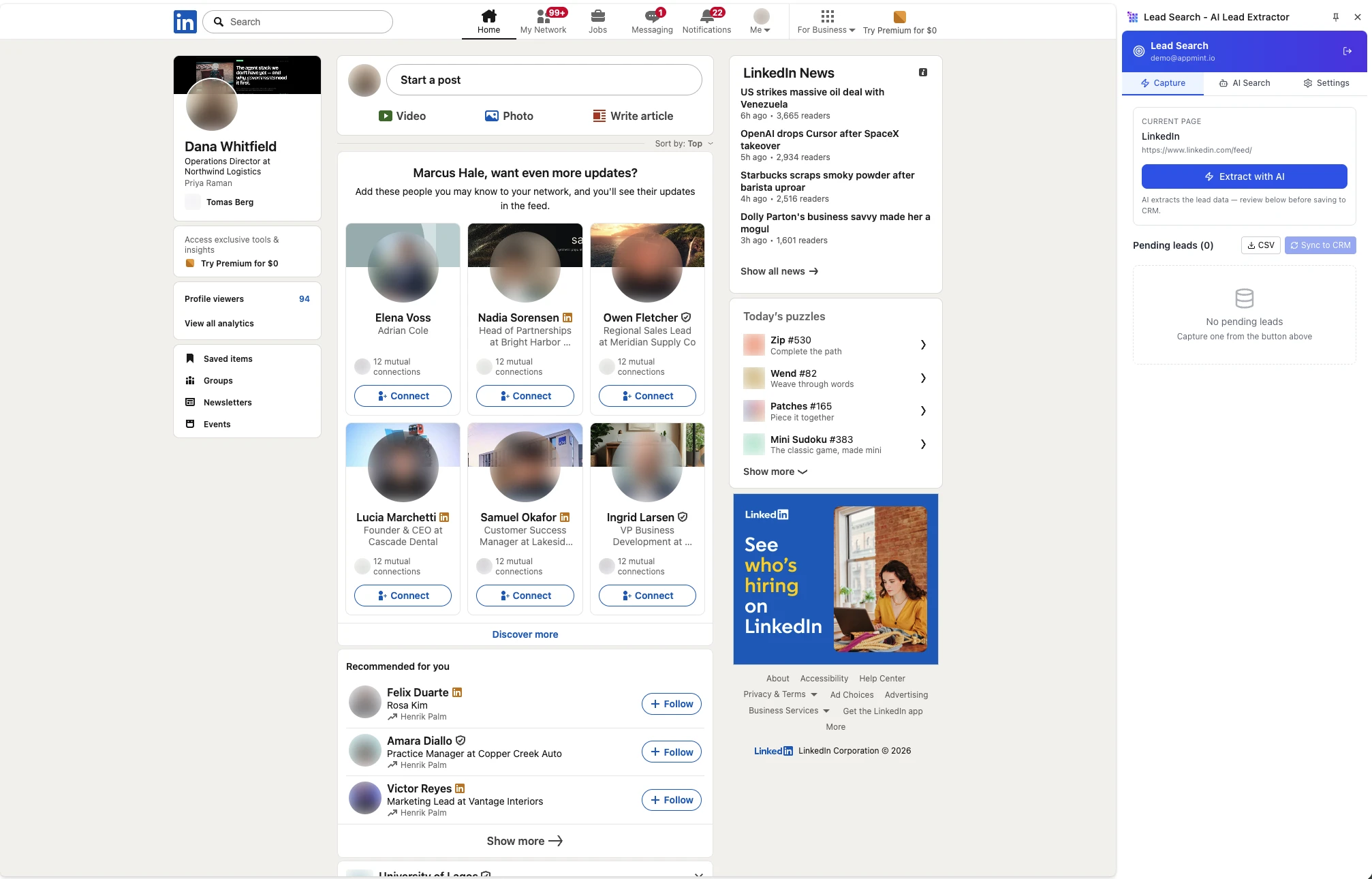
- 01It knows where it is
The panel names the current page and its URL, so what it extracts is what you are actually looking at.
- 02Nothing saves itself
Captures land in a pending list. You review them, then sync to the CRM or take a CSV.
The whole thing lives beside the page.
Three tabs do the whole job: take what is on the page, hand the AI a goal and let it work the search itself, or connect it to your CRM.


It sees the page the way you do.
No CSS selectors, no brittle scraping rules. LeadSearch snapshots the visible text and hands it to a model, which returns a structured record — which is why it still works the week after LinkedIn changes its markup, and why it finds things a selector never could.
Amara Nkrumah
Head of Operations at Northbridge Logistics
London, United Kingdom · 500+ connections
Northbridge Logistics · 240 employees
Previously: DHL, Maersk
- company
- Northbridge Logistics
- role
- Head of Operations
- size
- 240 employees
- authority
- Decision maker
- stack
- Salesforce · NetSuite
- intent
- Hiring 3 dispatch roles
Written straight into your collections — matched, enriched and in a pipeline. No file in between.
Or set it running and walk away.
Manual mode captures what you are looking at. Autonomous mode takes a brief and works the search itself — scrolling, opening, extracting — with pacing you control so it behaves like a person reading, not a bot hammering.
LinkedIn campaigns
- Search query
- “CTO tech company San Francisco”
- Job titles
- Filter list
- Companies
- Filter list
- Locations
- Filter list
- Connection degree
- 1st, 2nd, 3rd or all
- Max results
- 100 by default
- Pacing
- Scroll and extract delays you set
Google Maps campaigns
- Search query
- “restaurants in San Francisco”
- Category
- Business type
- Minimum rating
- 1–5
- Minimum reviews
- Count
- Centre & radius
- Location, in km
- Extract
- One business, or everything visible
Running it
- States
- Idle, running, paused, completed
- Progress
- Live count while it works
- Browser
- Chrome — Manifest V3
- Interface
- Side panel and popup
- Sign in
- API key, or detected session
- Credentials
- Extension storage, scoped
The questions reps ask.
Because it does not read class names. LinkedIn rotates its markup constantly, and any tool built on CSS selectors is one deploy away from silently capturing nothing. LeadSearch snapshots the page the way a person sees it — title and visible text — and an AI agent returns the structured record. There are no selectors to maintain, so there is nothing to break.