Four things, not forty tabs.
An agent that builds it, a customer record that gets smarter on its own, an app your staff carry, and a backend and API underneath that you never have to assemble. Everything below is the running product — click through it.
- No card
- No install
- Keep your domain
One record.
Nine days of it getting smarter.
Most CRMs are a filing cabinet you have to keep filling in. This one is written to by the agents, the storefront, the workflows and the books — so the record is the business, not a summary of it someone typed up afterwards.
- name
- Amara Nkrumah just written
- source
- Pricing page · organic just written
3 fields on this record · written by Web form
A stranger fills in a form.
Four fields and an IP address. At most companies this is where the record stops improving until a human gets to it — usually two days later.


One record, every screen that touches it.
The customer record is not a filing cabinet you keep topping up. It is what the storefront, the workflows and the phone line all write to — which is why the dialer opens on top of the work instead of in another tab.


Every channel. One agent.
One set of records.
These are the live demos — the real thing, not a video. Pick a channel, start a conversation, then watch what it writes back into the platform on the right.
Where the business is actually run.
Selling, fulfilment, the shape of your own data and anything you put on a date — four parts of one back office, over the same records the CRM holds.


It ships with an app.
Not a responsive page.
The same records, the same permissions, the same agents — rendered natively for the people who are not at a desk. It carries your business phone line too: real calls in and out, ringing on the lock screen like any other call. Nothing to rebuild, nothing to keep in sync.
The unglamorous half, done properly.
Every one of these is a project on its own, and each is the kind of thing that looks finished long before it is safe.
Sign-in that will survive an audit.
Email and password, Google, Apple and Facebook, magic links, invitations, blocklists, two-factor and device management — with sessions and refresh handled for you.
- Passwordverified
- Magic linksent
- Two-factorconfirmed
- Session issuedrefresh handled
Two hundred services.
One key.
A gateway in front of everything your business runs on — authenticated, rate-limited, monitored and audited in one place. Swap a vendor and the calls your app makes do not change. No drawer full of credentials, no per-tool SDK to learn.
POST /v1/payments/charge{ "contact": "amara", "amount": 1840000 }↓ 200 OK · 41ms{ "status": "succeeded", "id": "ch_3PdQ…" }- 1
- Key to rotate
- 99.99%
- Gateway uptime
- <50ms
- Added latency
Point your own agent at your own business.
One endpoint speaks MCP, so Claude, Cursor or anything else that talks the protocol can read your services and act on them — with the same permission model your staff sign in under, not a second set of keys.
- 01
list_servicesWhat this organisation exposes — the same manifest the in-process agent reads.
- 02
describe_serviceThe shape of one service: its methods, their arguments, what is required.
- 03
call_serviceRun it for real. Org and user come from the headers, never from the model.
- Local
http://localhost:3300/mcpYour machine - Production
https://appengine.appmint.io/mcpLive
{
  "mcpServers": {
    "appengine": {
      "url": "https://appengine.appmint.io/mcp",
      "headers": {
        "orgid": "<org>",
        "Authorization": "Bearer <token>"
      }
    }
  }
}
Drop this into your client’s MCP settings. Requests without a bearer token are refused.
You watch it happen.
Not a progress bar.
Every build is a real, inspectable sequence of work — schema before screens, integrations before automations, agents last because they need the tools to exist first. This is a clinic booking system, plotted second by second.
It asks the question a stranger could not.
A general coding assistant would have written a login form and guessed at an endpoint. This one asks the live platform first, finds three separate identities in play, and asks which you meant — because getting that wrong hands a customer a staff token.
- It looked, it did not guess. AppEngine publishes its own docs and OpenAPI live, so the agent reads the current platform rather than a cheat sheet somebody has to keep updating.
- The tenant is not a variable it invents. Your organisation id is a fixed machine value carried into every turn — never derived from a brand name, a hostname or the copy on the page.
- No wiring step. The route exists, the header is filled in, and it runs against your data the moment it is saved.
- You
Add sign-in to the client dashboard.
GET /discover/01-auth · reading the live auth docs- Agent
Who signs in here? There are three identities in play and they are not interchangeable — you, the builder; your customers, who see their own work; and staff, who run the business. Each has its own endpoint.
- You
Customers.
orgid ← .vibe/project.json · a machine id, never guessed- signin.js
const res = await fetch(`${BASE}/profile/customer/signin`, {
  method: "POST",
  headers: { orgid: ORG_ID, "Content-Type": "application/json" },
  body: JSON.stringify({ email, password }),
});
A panel in a real editor. Not a chat box.
The agent sits beside the files, the terminal and the preview, looking at the same project you are — in an environment that already has your database, auth and payments in it.
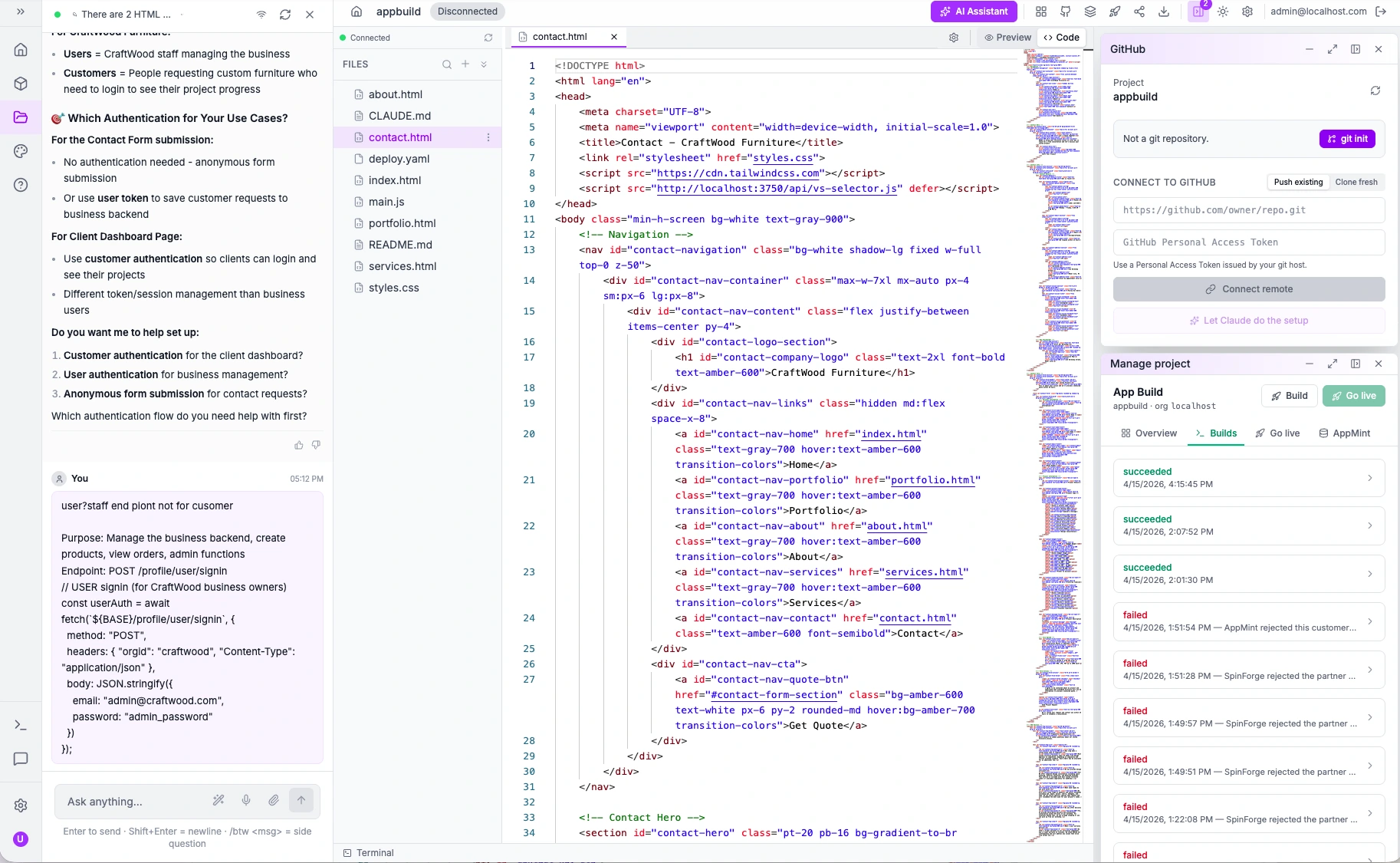
- 01It sees the project
Not a pasted snippet — the files on disk, the routes they call and the collections behind them.
- 02You keep the code
Ordinary HTML, CSS and JS. Nothing proprietary to unpick if you ever leave.
What owners actually ask us.
The building part is a conversation — you describe what your business does and the agent builds it against a backend that already works. What you bring is knowledge of your own trade: how you take a booking, what a job costs, who can give a refund. That is the part no software can supply, and the part you already have.